
OneID, one roster—smooth management across Teams and Classroom.
Product Overview
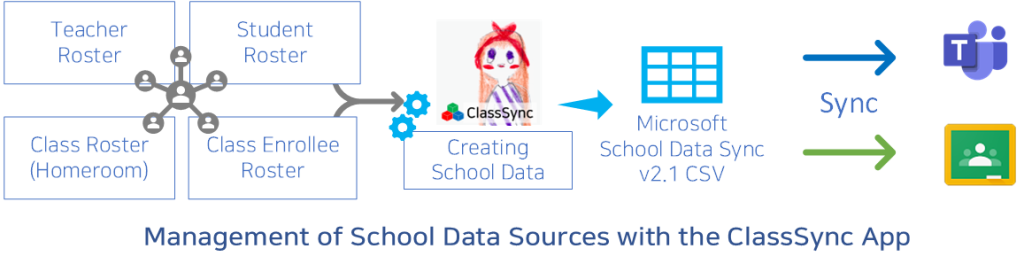
ClassSync standardizes each user’s sign-in ID under OneID so that each user can sign in to and use Microsoft 365 and Google Workspace with the same login ID, supported by roster management capabilities. It also provides class assignment and course enrollment roster management features required to set up classroom environments (Microsoft Teams, Google Classroom).
By managing rosters under one standard, ClassSync helps standardize operational rules and reduces repetitive registration and update tasks across platforms. This is particularly effective during high-volume periods such as the start of a term, easing administrative workload, shortening processing time, and improving data consistency.
Rosters and related data are managed on the administrator’s local device (Local DB) using a local processing and storage approach. ClassSync does not store or transmit roster data to the developer’s servers. This reduces privacy exposure risk and enables direct data control, strengthening security and privacy.
Key Features
Feature Comparison Across Products
The following table presents a factual comparison of selected features commonly found in school roster and integration management solutions. The comparison is based on publicly available product documentation as of the latest update.
- Simultaneous support for both Microsoft Teams and Google Classroom
- Local data storage to enhance privacy
- Comprehensive account and group management from a unified roster
| Feature | Availability |
|---|---|
| Integration with both Microsoft Teams and Google Classroom | ✔️ Available in some solutions |
| Local data storage (on-device) for enhanced privacy | ✔️ Available in select platforms |
| Unified roster management from a single source | ✔️ Supported by certain systems |
| Microsoft SDS CSV v2.1 file generation | ✔️ Supported by compatible tools |
Microsoft SDS CSV v2.1 Support
Our app supports generating Microsoft School Data Sync (SDS) CSV v2.1 files to ensure compatibility with Microsoft 365 Education environments.
It also leverages SDS v2.1–formatted data to support Google Classroom class creation and management, simplifying roster-driven provisioning for IT administrators.
SAML-based SSO Enablement
Supports building a SAML-based Single Sign-On (SSO) environment by using Microsoft or Google as the Identity Provider (IdP).
Provides account and user attribute provisioning and synchronization required for SSO.
Differentiators
- Unified roster management across Microsoft Teams and Google Classroom
- Enhanced privacy with local-device data storage
- Distributed via Microsoft Store for simplified and trusted installation
- Built for IT administrators and teachers for efficient operations
Security & Privacy
- Roster/user data is stored on the administrator’s local device rather than on external servers, strengthening privacy protection.
- Designed to support GDPR and applicable privacy requirements.
Use Cases
- IT administrators or teachers who require secure, local control of roster data: All roster information is stored and managed exclusively on the device where the app is installed—it’s never sent to external servers—ensuring maximum privacy and compliance with data protection policies.
- Schools and educational institutions using both Microsoft Teams and Google Classroom: Perfect for managing hybrid digital learning environments across multiple platforms with consistency and ease. In particular, by utilizing the Microsoft School Data Sync (SDS) standard CSV format (v2.1), synchronization with Google Classroom is possible, enabling consistent data management across platforms.
- IT administrators managing large volumes of user accounts and class groups: You can streamline the setup and maintenance of student accounts, teacher accounts, and class groups in schools with a large student population using powerful, scalable tools.
- Teachers who need secure and efficient roster management: Simplify class roster organization and maintain accurate user data across integrated platforms
Microsoft Education Solution Partner & School Data Sync Advanced Partner
Join Us as a Global Partner for ClassSync!
We are seeking partners worldwide to distribute ClassSync licenses and provide technical support. Let’s grow together in the global EdTech market.
Fair and Sustainable Collaboration for Shared Growth and Success